Part 4 of 4: Check that it works
Four checks, from the folder layout to live results in a mission. If one fails, the troubleshooting page picks up exactly where it failed.
-
Compare your folders
Everything BepInEx and both mods add, in File Explorer's order. With only one mod installed, you'll have only its DLL and its settings file.
- Diplomacy is Not an Option
- BepInEx from the BepInEx zip
- cache
- config
- BepInEx.cfg
- com.stixsworldhd.ungodlydiplomacyai.cfg created by the AI mod
- com.stixsworldhd.ungodlydiplomacyresearch.cfg created by the Research mod
- core 18 files
- patchers
- plugins
- UngodlyDiplomacyAI.dll AI mod
- UngodlyDiplomacyResearch.dll Research mod
- LogOutput.log
- Diplomacy is Not an Option_Data
- MonoBleedingEdge
- .doorstop_version from the BepInEx zip
- changelog.txt from the BepInEx zip
- Diplomacy is Not an Option.exe
- doorstop_config.ini from the BepInEx zip
- UnityCrashHandler64.exe
- UnityPlayer.dll
- winhttp.dll from the BepInEx zip
- BepInEx from the BepInEx zip
In File Explorer,
winhttp.dllshows as 26 KB,doorstop_config.inias 2 KB,UngodlyDiplomacyAI.dllas 252 KB andUngodlyDiplomacyResearch.dllas 236 KB.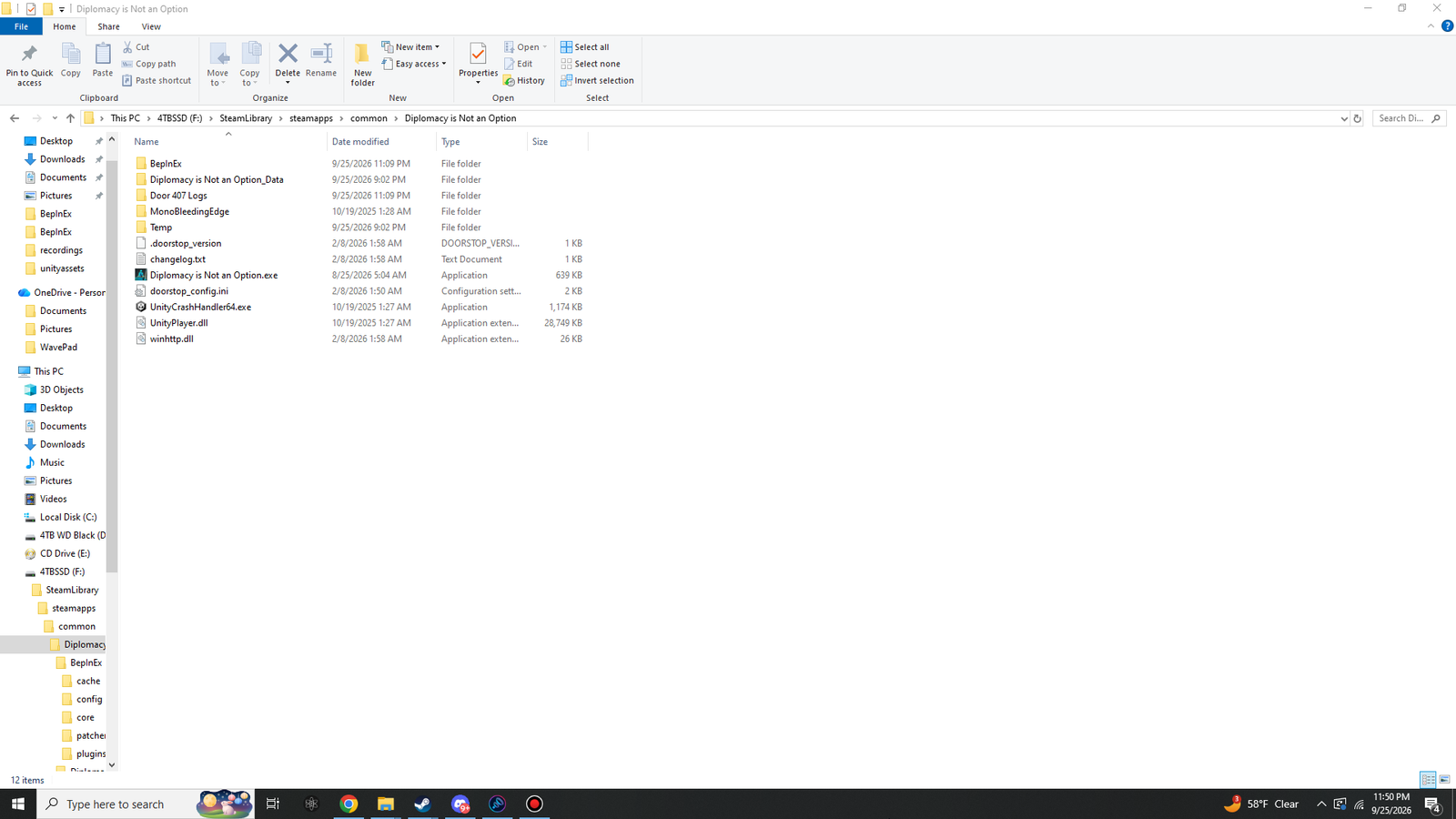
The game folder with BepInEx installed: winhttp.dll, doorstop_config.ini, .doorstop_version and changelog.txt sit right beside Diplomacy is Not an Option.exe. - Diplomacy is Not an Option
-
Read the log
Start the game, reach the main menu, then open
BepInEx\LogOutput.log. BepInEx rewrites it on every launch, so it always describes the latest start. With both mods installed, BepInEx reports:[Message: BepInEx] BepInEx 5.4.23.5 - Diplomacy is Not an Option (…) … [Info : BepInEx] 2 plugins to load [Info : BepInEx] Loading [Ungodly Diplomacy AI 1.0.1] … [Info : BepInEx] Loading [Ungodly Diplomacy Research 1.2.0]The plugin count includes any other plugins you have. The Research mod declares the AI mod as a soft dependency, so the AI mod loads first.
From Ungodly Diplomacy AI
[Info   :Ungodly Diplomacy AI] [Harmony] 8 patches applied, 0 failed, 1 mouse-wheel call site(s) rewritten.
[Info   :Ungodly Diplomacy AI] [FrontEnd] PlayerLoop hook installed at the end of Unity's Update phase.
[Info   :Ungodly Diplomacy AI] [FrontEnd] UI host 'UngodlyDiplomacyAI_UI' created (start-up).
[Info   :Ungodly Diplomacy AI] Ungodly Diplomacy AI 1.0.1 by StixsworldHD (StixsmasterHD4k) loaded - ungodly madly vastly enhanced, advanced, and improved AI, pathfinding, ballistics and coroutines. Press F8 for settings.
From Ungodly Diplomacy Research
[Info   :Ungodly Diplomacy Research] Ungodly Diplomacy Research 1.2.0 by StixsworldHD (StixsmasterHD4k) loaded - ungodly madly vastly enhanced, advanced, and improved repeatable research, cost scaling, Research Mastery and coroutines. Press F9 for settings.
[Info   :Ungodly Diplomacy Research] [Compat] Ungodly Diplomacy AI 1.0.1 detected: shared cursor hand-over, coroutine redirect hand-off and no-teleport speed limits are active.
[Info   :Ungodly Diplomacy Research] [Harmony] … patches applied, 0 failed; stacking hook sites: …
The
[Compat]line appears only when the AI mod is installed too.In both mods'
[Harmony]lines, the number that matters most is 0 failed. Each time you press a menu key, that mod also logs which input path saw it:[Info :Ungodly Diplomacy AI] [Hotkey] F8 via Unity Input.GetKeyDown at frame … -> window opened [Info :Ungodly Diplomacy Research] [Hotkey] F9 via Unity Input.GetKeyDown at frame … -> window opened -
Open the Status tabs
Each window's last tab is Status. It shows live state, counters, the Harmony patch report and any errors.
Ungodly Diplomacy AI (F8)
State shown Meaning waiting for a game worldNo match is loaded yet. Normal at the main menu. startingThe system is starting up. ACTIVE (Ungodly)The mod's system is running. off - original system runningYou switched this system off; the game's own version runs. off (mod disabled) - original system runningMod Enabled on the General tab is OFF. FAULTED - original system running (use 'Clear faults')The automatic fallback switched this system off after repeated errors. See A system shows FAULTED. Ungodly Diplomacy Research (F9)
State shown Meaning waiting for a mission (new game or loaded save)No mission is loaded yet. Normal at the main menu. waiting for the research system to startThe game's research system hasn't started yet. ACTIVEThe research engine is running. idle (Ungodly Diplomacy AI handles it)Shown for the coroutine redirect while the AI mod's own redirect is on, so nothing runs twice. FAULTED - original research rules running (use Clear faults)The safety net switched the research engine off after repeated errors. See A system shows FAULTED. The Research Status tab also has Clear faults and Re-apply now buttons.
-
Play a mission
Ungodly Diplomacy AI
Start or load a match. The log gains one more line as the mod joins the game world:
[Info :Ungodly Diplomacy AI] [Injector] Ungodly systems injected into world '…' (FightGroup, PathFindingGroup, PhysicsSystemsGroup).Let units fight and move for a minute, then open the AI Status tab again. The systems should read
ACTIVE (Ungodly), and counters such as Unit brain updates, New routes solved and Shots re-solved should be climbing.Ungodly Diplomacy Research
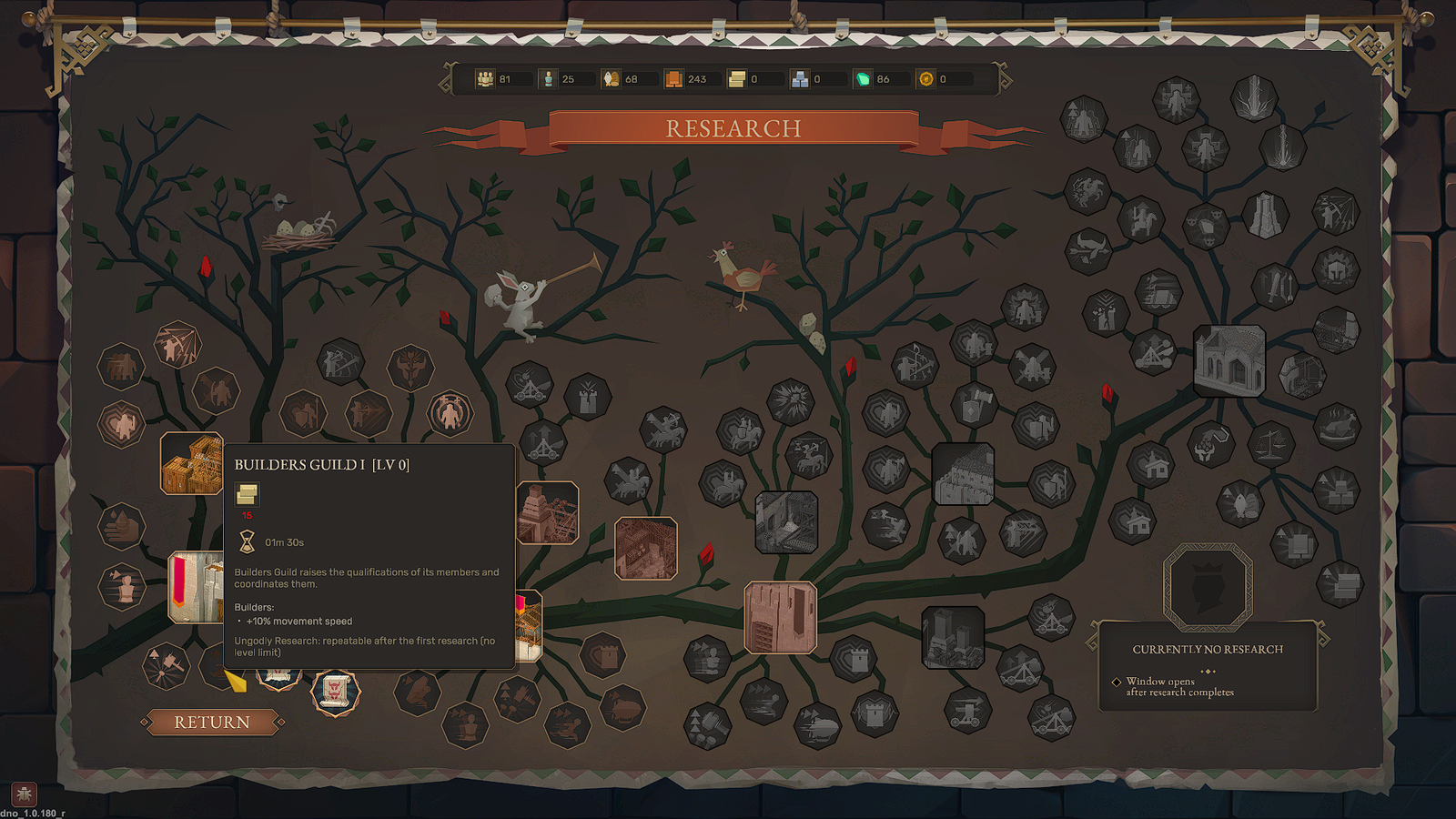
Open the research tree. Research that can be repeated says so in the last line of its tooltip:

The research tooltip, enlarged twice. Click to see the whole research tree. - Research it as normal. Level 1 is the vanilla research.
- When it finishes, it opens again at its real scaled price. The tooltip title shows the level change, such as
[Lv 3 -> 4], with the effect multiplier now and next. - Each finished level writes
[Research] … reached level …to the log and, with Level-Up Popups ON, shows a banner that fades away without blocking clicks.
The Research window's Levels tab lists every research of the current mission with its level, next price and time, and effect multiplier.
All four checks passed?
The install is complete. Every system can be tuned or switched off live in the F8 and F9 windows; the AI settings and Research settings pages explain every option.