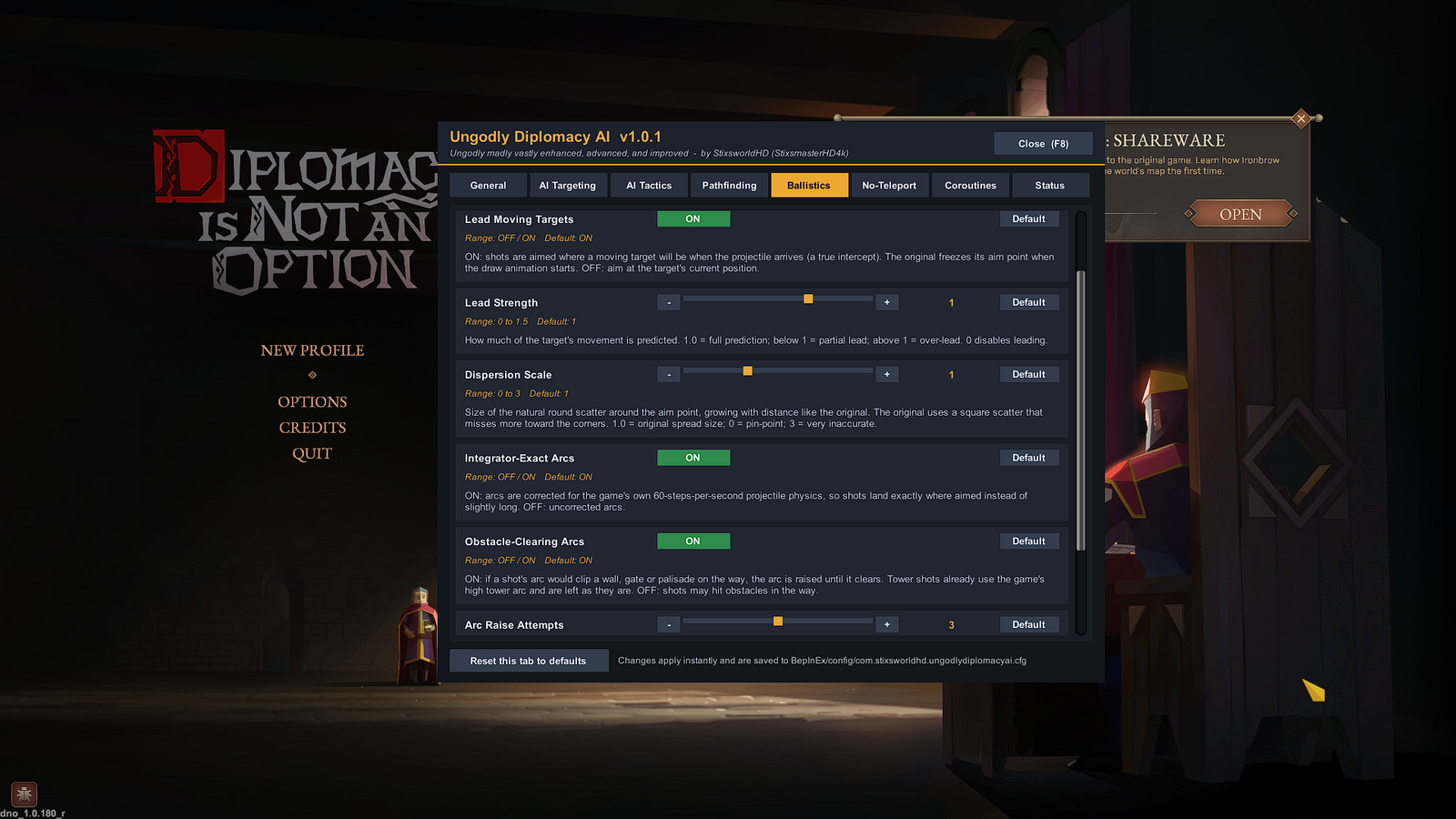
All 42 settings live in two places that stay in sync: the in-game window on F8, and the file BepInEx\config\com.stixsworldhd.ungodlydiplomacyai.cfg. The window is the easy way; the file is handy for sharing a setup or fixing a key clash while the game is closed.
The F8 window
View full size 1920 × 1080Ungodly Diplomacy AI: the F8 window on its Ballistics tab, opened at the main menu. Every row shows its range, its default and a plain-language explanation.
Press F8, or your own menu key, to open and close it. It has eight tabs: General, AI Targeting, AI Tactics, Pathfinding, Ballistics, No-Teleport, Coroutines or Status.
Every row shows the setting, its current value, its range and default, and a plain-language explanation.
Change a value with its slider, the − and + step buttons, an ON/OFF button, or, for the menu key, by pressing the new key.
Default resets one row; Reset this tab to defaults resets the whole tab.
Changes apply instantly, even mid-battle. They're saved when you close the window, and every few seconds while it's open.
The mouse cursor
While the window is open the cursor is shown and free, and clicks and mouse-wheel zoom over the window never reach the game. When you close it, the cursor goes back exactly as the game had it: confined to the game window, or locked if you're directly controlling a unit.
The Status tab has no settings. It shows each system's live state and counters; Part 4 explains what it shows.
Rebind the menu key
If another program already uses F8 as a global hotkey (recording, streaming and overlay software often do), give the window a different key. Avoid F9 if you also use Ungodly Diplomacy Research.
In the window: on the General tab, click the key button on the Menu Key row and press the key you want. It reads Press a key... (Esc cancels) while it waits.
In the config file, with the game closed: change the Menu Key line under [1. General]. Write the main key first, then any modifier keys, joined with +:
Two examples (use one)
Menu Key = F7
Menu Key = F8 + LeftControl
Key names are Unity's and are case-sensitive, for example F7, Insert, Home, Keypad0, LeftControl, LeftAlt and LeftShift. For Ctrl, Alt and Shift, either side of the keyboard counts.
The config file
BepInEx writes BepInEx\config\com.stixsworldhd.ungodlydiplomacyai.cfg the first time the game starts with the mod. Above every setting it repeats the range, default and explanation from the window. This is how the file begins:
## Settings file was created by plugin Ungodly Diplomacy AI v1.0.1
## Plugin GUID: com.stixsworldhd.ungodlydiplomacyai

[1. General]

## Min: any single key | Max: any key plus modifier keys (Ctrl/Alt/Shift) | Default: F8
## Opens and closes the Ungodly settings window. While it is open the mouse cursor is shown and unlocked, the game ignores clicks and mouse-wheel zoom over the window, and when you close it the cursor is handed back to the game exactly as it was (confined to the game window, or locked while you directly control a unit).
# Setting type: KeyboardShortcut
# Default value: F8
Menu Key = F8

## Min: false (off) | Max: true (on) | Default: true
## Master switch. ON: the Ungodly systems replace the game's combat AI, pathfinding, ballistics and coroutines. OFF: every original system takes over again instantly, even mid-battle, with no restart needed.
# Setting type: Boolean
# Default value: true
Mod Enabled = true

…
Edit it with the game closed. The mod saves the file when you close the F8 window and every few seconds while it's open, so edits made while the game runs can be overwritten.
Use a dot for decimals, such as 0.8, whatever your Windows region settings.
Keep each number between the Min and Max listed above it.
To reset everything, delete the file while the game is closed. The next start writes a fresh one with every default.
General
4 settings on the General tab, stored under [1. General] in the config file.
Setting
Default
Range
What it does
Menu Key
F8
Any key, optionally with Ctrl, Alt or Shift
Opens and closes the Ungodly settings window. While it is open the mouse cursor is shown and unlocked, the game ignores clicks and mouse-wheel zoom over the window, and when you close it the cursor is handed back to the game exactly as it was (confined to the game window, or locked while you directly control a unit).
Mod Enabled
ON
ON or OFF
Master switch. ON: the Ungodly systems replace the game's combat AI, pathfinding, ballistics and coroutines. OFF: every original system takes over again instantly, even mid-battle, with no restart needed.
GUI Scale
1
0.75 to 2.5, in steps of 0.05
Size of this settings window. It already grows with your screen resolution; raise this if the text is still too small (for example on a 4K screen), lower it for a more compact window.
Error Fallback Threshold
25
1 to 500, whole numbers
Safety net. If one replacement system hits this many errors inside a single half-second health check, it switches itself off and the original game system takes over, so your battle keeps running. Lower = bails out sooner; higher = tolerates rare hiccups.
AI Targeting
12 settings on the AI Targeting tab, stored under [2. AI Targeting] in the config file.
Setting
Default
Range
What it does
Replace Vanilla Combat AI
ON
ON or OFF
ON: every soldier, archer, tower crew, caster and enemy uses the Ungodly target-acquisition brain. All original behaviours are kept: casting order, forced attacks and casts, Hold, Patrol, Defend, attack-move, towers, gates, sieges and kamikaze units. OFF: the original AI runs.
Utility Targeting
ON
ON or OFF
ON: units weigh every valid target (distance, wounded enemies, dangerous enemies, armour counters, overkill and high-value units) and attack the smartest choice. OFF: units pick the closest valid target like the original game, still inside the Ungodly system.
Proximity Weight
1
0 to 3, in steps of 0.05
How much being close matters when choosing a target. Higher = units stick to nearby enemies and waste less time walking; lower = they reach further for a better target. 0 ignores distance completely.
Finish-Off Weight
0.8
0 to 3, in steps of 0.05
How much units prefer badly wounded targets. Higher = more enemies are finished off quickly, so their numbers drop faster; lower = damage is spread more evenly. 0 ignores target health.
Threat Weight
0.7
0 to 3, in steps of 0.05
How much units prefer targets that deal a lot of damage. Higher = your archers delete enemy damage-dealers and heavy hitters first; lower = they ignore how dangerous a target is. 0 turns this off.
Armour Counter Weight
0.9
0 to 3, in steps of 0.05
How much units prefer targets their weapon is strong against, using the game's own armour-versus-weapon damage table. Higher = every weapon seeks the armour it beats and avoids wasted hits; 0 ignores armour.
Overkill Avoidance Weight
0.8
0 to 3, in steps of 0.05
How much units avoid piling onto a target that other attackers are already about to kill. Higher = volleys spread across more enemies with less wasted damage; 0 lets everyone hit the same target.
Priority Target Weight
0.5
0 to 3, in steps of 0.05
How much units prefer high power-level units such as heroes, champions and elite troops. Higher = elites get focused down; 0 treats every unit the same. Your 'defend priority' orders are always respected.
Target Stickiness
0.25
0 to 1, in steps of 0.05
Bonus for the target a unit is already fighting, so it does not flip between targets every second. Higher = more committed to the current fight; lower = switches as soon as something better shows up.
Extra Search Rings
1
0 to 3, whole numbers
How many extra rings of the game's search grid a unit examines after the first ring that contains an enemy. 0 = nearest ring only (fastest); higher = a wider choice of targets for a little more CPU.
Max Candidates Per Search
24
4 to 96, whole numbers
Hard cap on how many enemies one unit scores in a single search. Higher = better choices in huge battles; lower = lighter CPU load when thousands of units are fighting.
Search Interval Scale
1
0.25 to 3, in steps of 0.05
How often idle units look for new targets. 1.0 = the original rhythm (every 0.8 to 1.2 seconds). Lower = sharper reactions but more CPU; higher = lazier units and more FPS.
AI Tactics
5 settings on the AI Tactics tab, stored under [3. AI Tactics] in the config file.
Setting
Default
Range
What it does
Healer Triage
ON
ON or OFF
ON: healers choose who to heal by how hurt they are, whether they are fighting right now, how close they are and how valuable they are. OFF: the original 'lowest health in range' rule.
Nearest Corpse Resurrection
ON
ON or OFF
ON: resurrectors (yours and the enemy's) raise the nearest corpse in range. OFF: the original rule, which takes whichever corpse the search grid returns first.
Ranged Kiting (Enemies)
ON
ON or OFF
ON: enemy archers and ranged casters that get rushed inside their minimum range step back to a safe distance and keep shooting, instead of dropping their target. OFF: original behaviour.
Ranged Kiting (Your Units)
OFF
ON or OFF
Same as above for your own free-moving ranged units. Units on Hold, Defend or Patrol, and units with a forced target, never kite, so your orders always win. OFF by default.
Kite Distance Margin
2
0.5 to 8, in steps of 0.25
Extra distance, in map cells, that a kiting unit puts between itself and a rushing enemy beyond its minimum range. Higher = safer but more walking; lower = tighter footwork.
Pathfinding
7 settings on the Pathfinding tab, stored under [4. Pathfinding] in the config file.
Setting
Default
Range
What it does
Replace Vanilla Pathfinding
ON
ON or OFF
ON: the Ungodly pathfinder builds every route and flow field for all units, citizens and enemies. OFF: the original pathfinder.
Distance-Weighted Routing
ON
ON or OFF
ON: routes between map regions are chosen by real walking distance. The original only counts how many regions a route crosses, which can send armies the long way round. OFF: original hop-count routing.
8-Direction Flow Fields
ON
ON or OFF
ON: flow fields use true 8-direction shortest paths that never cut wall corners, which removes the zig-zag 'staircase' walking. OFF: the original 4-direction fields.
Congestion Avoidance
0.35
0 to 2, in steps of 0.05
How strongly new routes avoid map regions already packed with units of the same side, so reinforcements flow around traffic jams. 0 = off; higher = stronger detours around crowds.
New Paths Per Frame
250
25 to 1000, whole numbers
Maximum number of brand-new routes solved per frame across both sides (the original uses 250). Higher = huge orders resolve faster; lower = smoother FPS when thousands of units are ordered at once.
Path Time Budget (ms)
4
0.5 to 20, in steps of 0.5
Time the pathfinder may spend per frame on new routes. It runs on a worker thread; requests over budget simply wait for the next frame. Higher = faster orders; lower = steadier frame times.
Path Cache Cleanup Interval
8
1 to 60, whole numbers
Every how many frames unused routes and flow fields are cleaned out of memory. 1 = every frame (like the original); higher = less CPU work for slightly more memory.
Ballistics
8 settings on the Ballistics tab, stored under [5. Ballistics] in the config file.
Setting
Default
Range
What it does
Replace Vanilla Ballistics
ON
ON or OFF
ON: every arrow, bolt, stone and tower shot fired at a unit gets a new trajectory solved at the moment it leaves the weapon. OFF: the original aiming.
Lead Moving Targets
ON
ON or OFF
ON: shots are aimed where a moving target will be when the projectile arrives (a true intercept). The original freezes its aim point when the draw animation starts. OFF: aim at the target's current position.
Lead Strength
1
0 to 1.5, in steps of 0.05
How much of the target's movement is predicted. 1.0 = full prediction; below 1 = partial lead; above 1 = over-lead. 0 disables leading.
Dispersion Scale
1
0 to 3, in steps of 0.05
Size of the natural round scatter around the aim point, growing with distance like the original. The original uses a square scatter that misses more toward the corners. 1.0 = original spread size; 0 = pin-point; 3 = very inaccurate.
Integrator-Exact Arcs
ON
ON or OFF
ON: arcs are corrected for the game's own 60-steps-per-second projectile physics, so shots land exactly where aimed instead of slightly long. OFF: uncorrected arcs.
Obstacle-Clearing Arcs
ON
ON or OFF
ON: if a shot's arc would clip a wall, gate or palisade on the way, the arc is raised until it clears. Tower shots already use the game's high tower arc and are left as they are. OFF: shots may hit obstacles in the way.
Arc Raise Attempts
3
0 to 6, whole numbers
How many times an arc may be raised to clear an obstacle. Each attempt lifts the arc peak by 30 percent. 0 disables raising.
Preserve Multishot Pattern
ON
ON or OFF
ON: extra projectiles from multishot skills keep their spread pattern around the new aim point. OFF: every projectile uses the round scatter.
No-Teleport
4 settings on the No-Teleport tab, stored under [6. No-Teleport] in the config file.
Setting
Default
Range
What it does
Block Teleports
ON
ON or OFF
ON: units never jump. The game's collision and movement code sometimes snaps a stuck unit several cells in one frame, even through walls. With this ON they walk there at a believable speed instead, and snaps through walls are refused. OFF: original snapping.
Speed Tolerance
6
2 to 20, in steps of 0.5
How many times a unit's own top speed a single frame of movement may reach before it counts as a teleport. Higher = allows faster legitimate bursts (charges, fear, speed skills); lower = stricter.
Minimum Step
0.35
0.05 to 3, in steps of 0.05
Extra distance, in map cells, allowed per frame on top of the speed limit, so crowd shoves and tiny corrections are never blocked.
Guard Citizens & Workers
ON
ON or OFF
ON: villagers, workers and caravans are protected from teleports too. OFF: only soldiers and enemies are guarded.
Coroutines
2 settings on the Coroutines tab, stored under [7. Coroutines (MEC Pro)] in the config file.
Setting
Default
Range
What it does
Run Game Coroutines On MEC Pro
ON
ON or OFF
ON: the game's own coroutines (music fades, window moves and timed UI tasks) run on More Effective Coroutines Pro instead of Unity's coroutine scheduler. They behave identically, including stopping when the game stops them or disables their object. OFF: Unity coroutines.
Log Coroutine Redirects
OFF
ON or OFF
ON: writes a line to the BepInEx log every time a game coroutine is moved onto MEC Pro. Useful for troubleshooting; leave OFF normally.