Part 2 of 4: Install BepInEx 5 (x64)
BepInEx is the mod loader: a separate open-source project that starts with the game and loads everything in its plugins folder. Get it from its official GitHub release.
- Version
- 5.4.23.5, released 8 February 2026
- File
BepInEx_win_x64_5.4.23.5.zip- Size
- 639,118 bytes (625 KB in File Explorer)
- SHA-256
82f9878551030f54657792c0740d9d51a09500eeae1fba21106b0c441e6732c4
-
Download the Windows x64 build
Download BepInEx_win_x64_5.4.23.5.zip Open the release page
The release page lists six files. Only one is right for this game:
File Use it? BepInEx_win_x64_5.4.23.5.zipYes. Windows, 64-bit: matches this game. BepInEx_win_x86_5.4.23.5.zipNo. For 32-bit games. BepInEx_linux_x64_5.4.23.5.zipNo. For native Linux games. On Steam Deck and Linux this game runs through Proton, which needs the Windows build. BepInEx_linux_x86_5.4.23.5.zipNo. For native 32-bit Linux games. BepInEx_macos_universal_5.4.23.5.zipNo. For native macOS games. BepInEx_Patcher_5.4.23.5.zipNo. A hard-patching tool this install doesn't need. Stay on BepInEx 5
Skip the BepInEx 6 pre-releases and the bleeding-edge builds. Both mods are compiled against BepInEx 5.4: their DLLs reference BepInEx 5.4.23.3.
-
Extract it into the game folder
Everything in the zip goes directly into the game folder, so that
winhttp.dllends up right besideDiplomacy is Not an Option.exe. That file is what starts BepInEx when the game launches.With Windows' built-in extractor
- Right-click
BepInEx_win_x64_5.4.23.5.zipand choose Extract All… - Click Browse…, open the game folder and click Select Folder.
- Check that the path ends in
\Diplomacy is Not an Optionwith nothing after it, then click Extract.
With 7-Zip
- Right-click the zip and choose 7-Zip › Extract files… (on Windows 11 it may sit under Show more options).
- Set Extract to to the game folder.
- Click OK.
The game folder now has four new files and a
BepInExfolder:- Diplomacy is Not an Option
- BepInEx from the BepInEx zip
- core from the BepInEx zip 18 files
- Diplomacy is Not an Option_Data
- MonoBleedingEdge
- .doorstop_version from the BepInEx zip
- changelog.txt from the BepInEx zip
- Diplomacy is Not an Option.exe
- doorstop_config.ini from the BepInEx zip
- UnityCrashHandler64.exe
- UnityPlayer.dll
- winhttp.dll from the BepInEx zip starts BepInEx
- BepInEx from the BepInEx zip
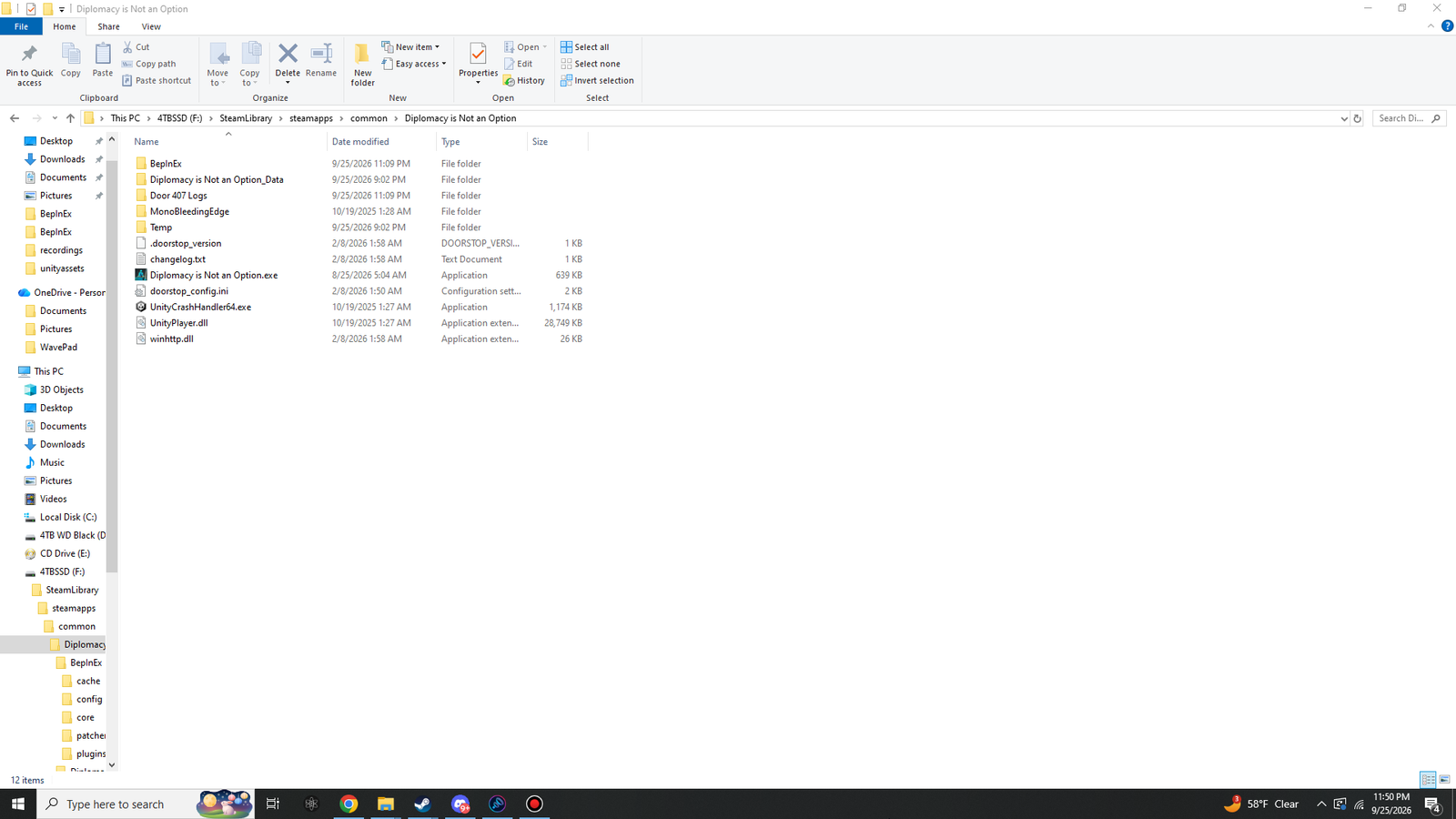
The game folder with BepInEx installed: winhttp.dll, doorstop_config.ini, .doorstop_version and changelog.txt sit right beside Diplomacy is Not an Option.exe. Common mistake: an extra folder
If the game folder now contains a folder called
BepInEx_win_x64_5.4.23.5, the files went one level too deep and BepInEx won't start:- Diplomacy is Not an Option
- BepInEx_win_x64_5.4.23.5 wrong place
- BepInEx
- .doorstop_version
- changelog.txt
- doorstop_config.ini
- winhttp.dll
- Diplomacy is Not an Option_Data
- MonoBleedingEdge
- Diplomacy is Not an Option.exe
- UnityCrashHandler64.exe
- UnityPlayer.dll
- BepInEx_win_x64_5.4.23.5 wrong place
Open that folder, select everything inside it, and move it up into the game folder. Then delete the empty folder.
- Right-click
-
Launch the game once
Start the game from Steam as usual. When the main menu appears, quit to the desktop. During this first start BepInEx builds the rest of its folder:
- BepInEx
- cache created on first launch
- config created on first launch
- BepInEx.cfg created on first launch
- core from the zip
- patchers created on first launch
- plugins created on first launch empty for now
- LogOutput.log created on first launch
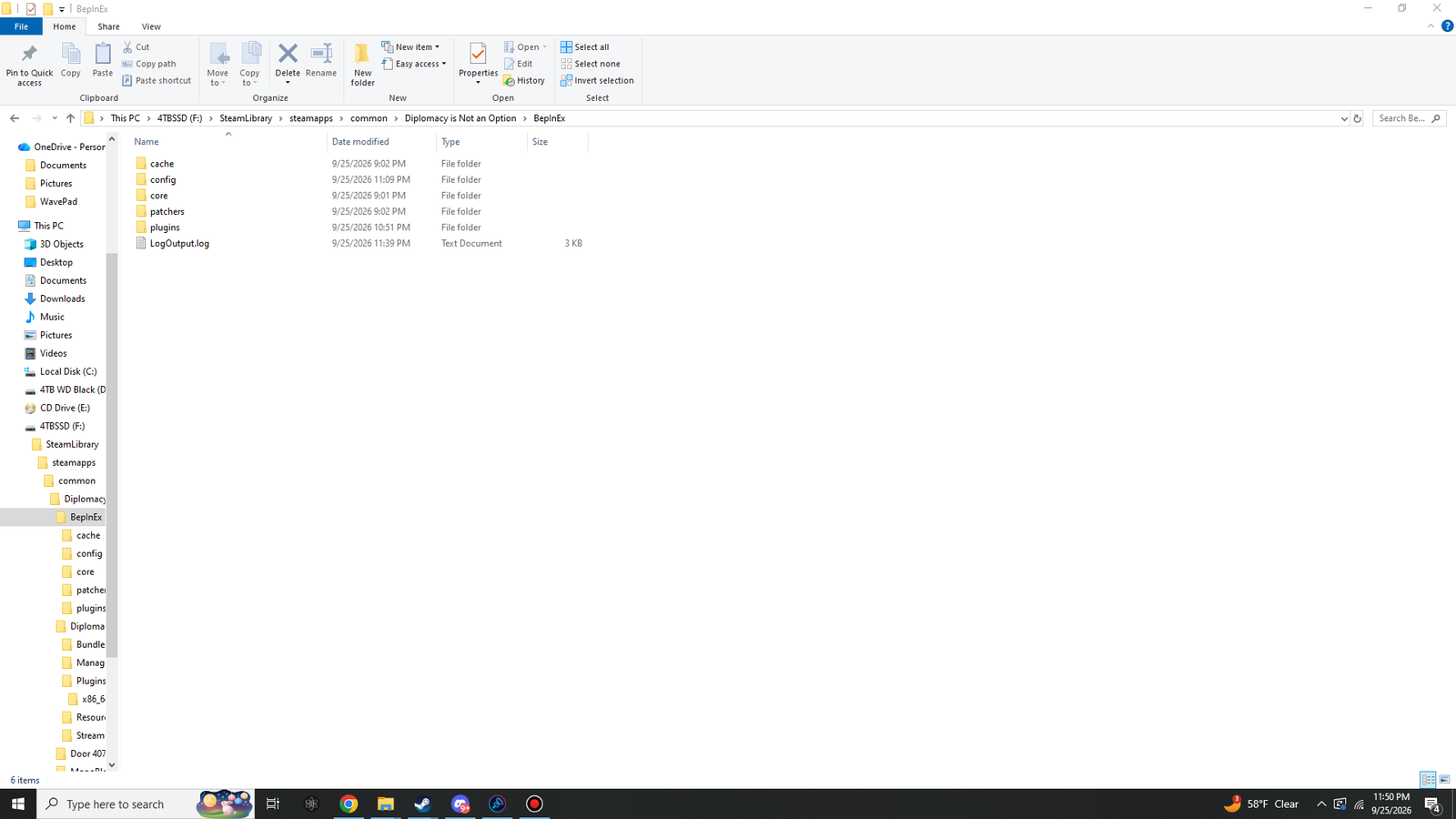
Inside BepInEx after the first launch. Only core came from the zip; BepInEx created everything else itself. - BepInEx
-
Check that BepInEx started
Open
BepInEx\LogOutput.login Notepad. Its first line names the BepInEx version and the game; the brackets hold the date of the game's .exe:[Message: BepInEx] BepInEx 5.4.23.5 - Diplomacy is Not an Option (…)Further down, with other lines between them, BepInEx's plugin loader reports in:
[Message:   BepInEx] Chainloader ready
…
[Message:   BepInEx] Chainloader started
…
[Message:   BepInEx] Chainloader startup complete
BepInEx is installed when
LogOutput.logexists and its first line names BepInEx 5.4.23.5 and Diplomacy is Not an Option.No
configfolder, nopluginsfolder, or no log at all? BepInEx didn't start: see BepInEx doesn't start. -
Optional: watch the log live
BepInEx can open a console window beside the game that shows the same log as it's written. Open
BepInEx\config\BepInEx.cfgin Notepad, find the[Logging.Console]section, and change itsEnabledline fromfalsetotrue:[Logging.Console] ## Enables showing a console for log output. # Setting type: Boolean # Default value: false Enabled = trueOther sections also have an
Enabledline; change only the one under[Logging.Console]. Set it back tofalseto hide the console again.